Take the Paperwork out of Hockey. Save Time. Stay Organized. Coach Smarter.

Hockey coaching is demanding — from planning drills to managing rosters, your time is valuable. HockeyApps.com gives coaches mobile-friendly tools to simplify lineup creation, game-day prep, and roster printing.
Build Game Lineups in Minutes
Create clean, printable hockey lineups right from your phone or tablet. Just download the app, Add your roster and select your players by position. Export to PDF or share with assistant coaches. No chicken scratch! No wasted time!
Manage Cross Ice Rotations - Fairly and Effortlessly
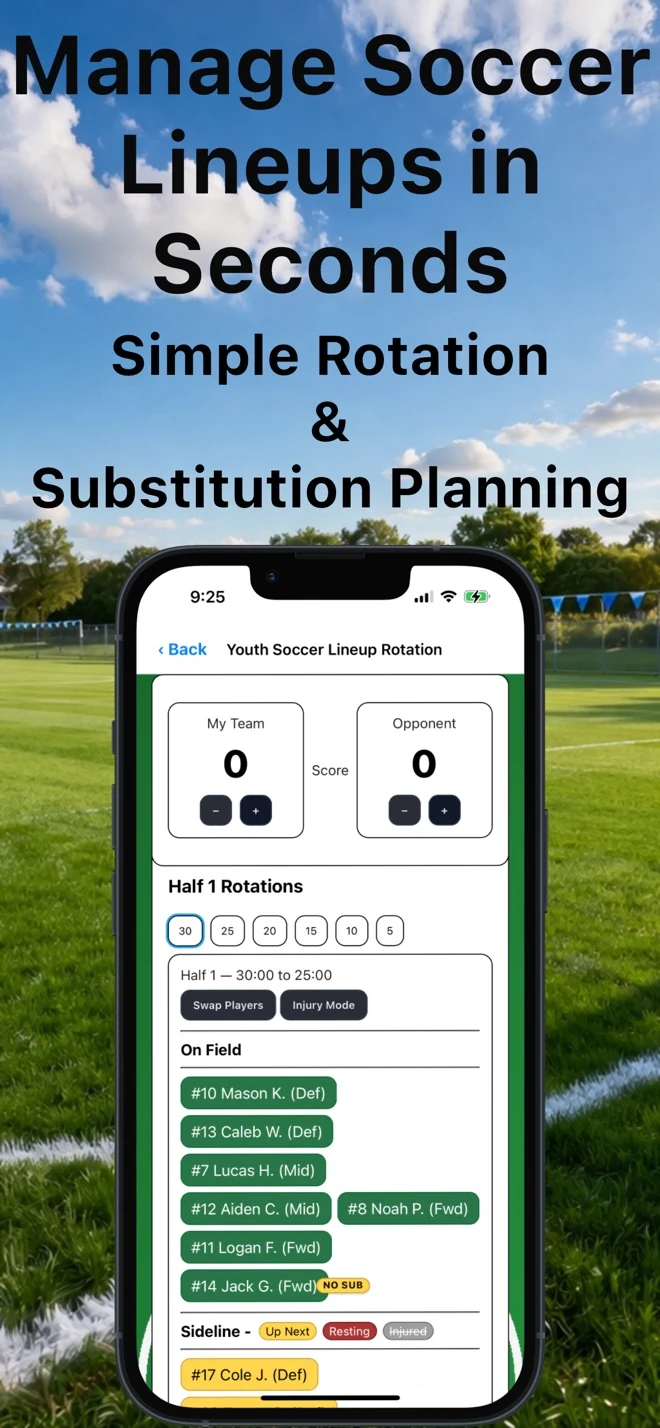
Cross-Ice Rotation Tool. Keep fair, balanced rotations — even with injuries or late arrivals. Key features: Automatically tracks “Up Next,” Bench, and Injured players.. Maintains proper order when players are removed or added back. Visual indicators for quick decision-making. Built for fast, in-game use. Perfect for: Cross-ice, half-ice, x-ice, Learn to play and full-ice youth hockey.

Discover the Features of HockeyApps.com

Custom Hockey Line Up Cards
Streamline your game preparation with our custom hockey line up card builder. Quickly design and update your team’s lineups, then export them as professional PDF lineups. Perfect for sharing with fellow coaches or printing before game time—no more scribbled rosters or last-minute edits.
Cross-Ice Player Rotation Tool
Cross-Ice Player Rotation Tool simplifies shift management during the chaos of game play. Designed for speed and clarity, it lets coaches quickly adjust rotations, handle injuries, and keep ice time balanced without losing flow. With clear visual cues and real-time updates, Cross-Ice Player Rotation Tool turns lineup decisions into a glance—not a guess.

HockeyApps.com Helps You Focus on Coaching, Not Paperwork

Hockey Coaching Simplified

The Best Coaches use HockeyApps.com

Frequently Asked Questions?

Yes—Hockey Lineup Manager allows you to mark players as injured or unavailable. This helps you keep your lineup accurate and organized without needing to rebuild it from scratch.

When a player is marked as injured or unavailable:

  • The player is clearly identified as unavailable within the app
  • The app automatically prevents that player from being assigned to multiple positions
  • Your existing line structure stays intact
  • You can quickly adjust lines without introducing errors

This is especially useful on game day when injuries, absences, or last-minute changes occur. Instead of rewriting lines or trying to remember who should be skipped, Hockey Lineup Manager helps you manage availability in real time while keeping everything clearly organized.

If a player becomes available again, you can easily re-enable them and return them to the lineup without disrupting the rest of your assignments. This keeps lineup changes fast, clean, and stress-free—exactly what coaches need under pressure.


Yes—Hockey Lineup Manager is designed specifically with youth hockey rules and scenarios in mind. The app was built by a youth hockey coach and reflects the realities of coaching younger teams, where rosters are smaller, substitutions are frequent, and line combinations often change during games.

Youth hockey presents unique challenges, including:

  • Smaller and changing rosters
  • Frequent substitutions and short shifts
  • Players missing games due to illness or injury
  • The need to manage fair ice time
  • Clear communication for players, parents, and assistants

Hockey Lineup Manager supports these scenarios by allowing coaches to quickly adjust lineups, mark players as injured or unavailable, prevent duplicate assignments, and manage both full-ice and cross-ice formats. The app adapts to how youth hockey is actually played, rather than forcing coaches into rigid structures.

Whether you’re coaching mites, squirts, peewees, or other youth levels, Hockey Lineup Manager helps you stay organized and focused on development—while keeping lineups accurate and easy to understand.


Hockey Lineup Manager replaces paper lineup boards with a faster, cleaner, and more reliable digital system. While paper boards and handwritten sheets are familiar, they break down quickly when changes happen—especially during fast-paced youth hockey games.

Unlike paper lineup boards, Hockey Lineup Manager:

  • Prevents duplicate player assignments by automatically blocking players from being placed in multiple positions at the same time
  • Handles last-minute changes instantly, allowing coaches to adjust lines for injuries, absences, or matchups without erasing or rewriting
  • Exports clean, professional PDF lineup cards for printing, sharing with assistants, or posting in the locker room
  • Works anywhere on your iPhone or iPad, so your lineup is always available at the rink, on the bench, or in the locker room

Paper lineup boards rely on handwriting, memory, and constant updating. They’re easy to smudge, hard to share, and often lead to confusion when lines change. Hockey Lineup Manager keeps everything organized digitally, so your lineup stays accurate, readable, and up to date throughout the game.

For coaches who want less chaos and more control on game day, Hockey Lineup Manager is a modern upgrade to the traditional paper lineup board.


Yes—Hockey Lineup Manager is fully optimized for both iPhone and iPad. The app is built specifically for iOS and iPadOS, with layouts and interactions designed to work smoothly on smaller phone screens as well as larger iPad displays.

On iPhone, Hockey Lineup Manager is fast and easy to use with one hand, making it ideal for quick checks, last-minute lineup changes, or referencing lines between shifts. On iPad, the larger screen provides a clear, readable view of lineups and rotations, which is especially useful on the bench, in the locker room, or during practices.

The app is designed to perform reliably under real game-day conditions, including busy rinks, limited time between shifts, and frequent lineup adjustments. Buttons, text, and layouts are intentionally simple and readable so coaches can make changes quickly without digging through menus.

Whether you’re using an iPhone in your pocket or an iPad mounted or held behind the bench, Hockey Lineup Manager adapts to your device and keeps your lineups and rotations accessible when you need them most.


Yes—Hockey Lineup Manager allows you to upload and use your team logo. Both the Lineup Builder and the Scoresheet Roster Sticker Generator support team logo uploads, so your exports look clean, professional, and fully branded.

Once your team logo is added, it can be used to:

  • Display your logo on PDF lineup cards
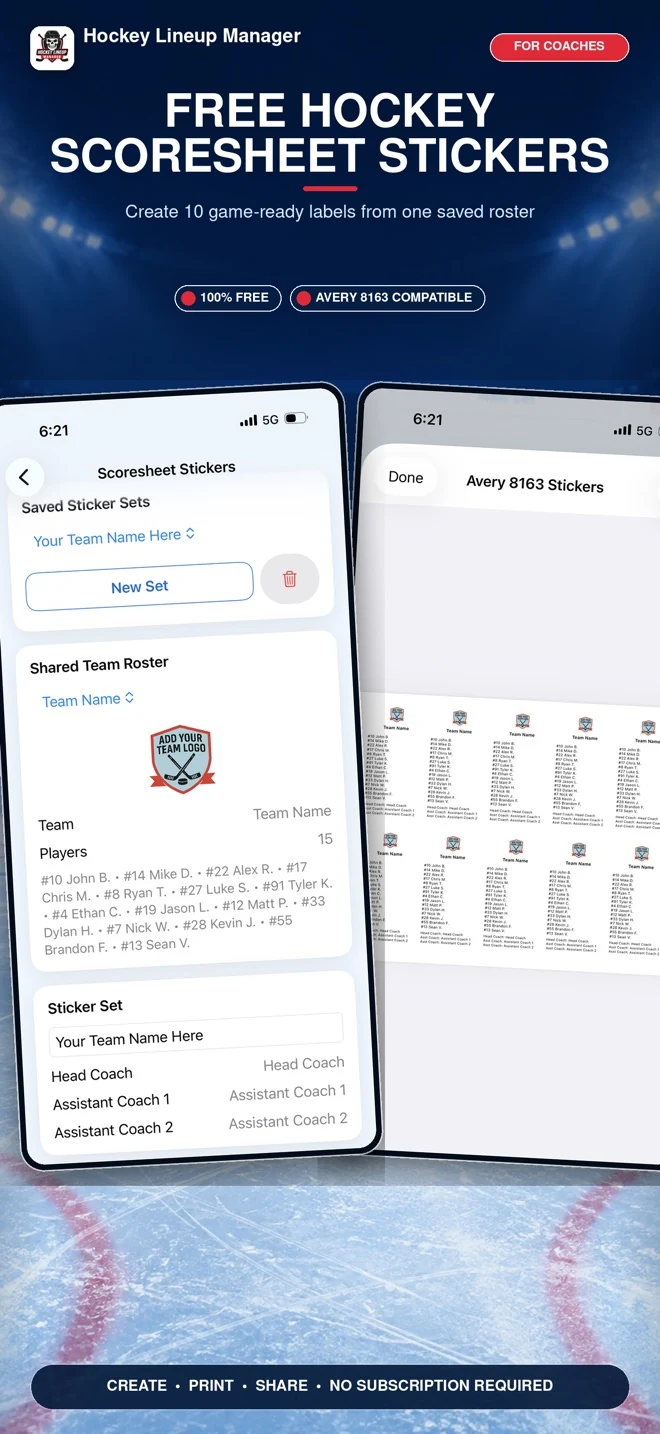
  • Include branding on scoresheet roster stickers
  • Create a consistent, professional look for locker room posting
  • Make shared lineups easier to recognize for players and staff

Uploading a logo helps eliminate generic-looking documents and gives coaches a polished presentation without extra design work. Logos are added directly within the app and automatically included in supported exports, so you don’t need to re-upload them for every game.

This feature is especially useful for youth, travel, and tournament teams that want clear, recognizable lineup sheets and scoresheet stickers on game day.


Hockey Lineup Manager is designed for hockey coaches who need a fast, reliable way to manage lineups and rotations on game day. It’s ideal for youth hockey, middle school, high school, and travel hockey coaches who want clear organization without complicated software or paperwork.

The app is especially useful for coaches who:

  • Need to make quick lineup changes during games
  • Want clear communication with assistant coaches
  • Prefer clean, printable lineup cards for the locker room or bench
  • Coach teams with frequent rotations, substitutions, or cross-ice formats

Built for Youth Hockey Coaches

Youth hockey presents unique challenges—short shifts, constant line changes, and the need to manage fair ice time. Hockey Lineup Manager is built specifically with youth hockey in mind, including mites, learn-to-play, house league, and travel programs.

Features like lineup editing, cross-ice rotation management, and printable lineup PDFs help youth coaches stay organized and focused on player development instead of tracking lines by memory or paper.


Ideal for Middle School and High School Teams

Middle school and high school coaches often juggle limited practice time, large rosters, and multiple assistants. Hockey Lineup Manager helps simplify game-day prep by providing a clear, repeatable system for managing forward lines, defense pairings, and goalies.

With professional PDF exports, coaches can easily share lineups with players and staff, ensuring everyone is on the same page before puck drop.


Perfect for Travel and Competitive Hockey

For travel and competitive teams, precision and clarity matter. Hockey Lineup Manager allows coaches to plan line combinations ahead of time, adjust quickly during games, and maintain consistent communication across tournaments and multi-game weekends.

The app is optimized for use on iPhone and iPad, making it easy to access lineups at the rink, on the bench, or in the locker room.


Helpful for Assistant Coaches and Team Managers

While Hockey Lineup Manager is built for head coaches, it’s also valuable for:

  • Assistant coaches who need quick access to lineups
  • Team managers helping with organization and communication
  • Coaches who want a single, shared reference for lines and rotations

Clear layouts and printable PDFs reduce confusion and eliminate the need for repeated explanations during games.


Not Just for One Level of Hockey

Whether you coach:

  • Youth hockey
  • Middle school or high school hockey
  • Travel or competitive teams

Hockey Lineup Manager adapts to your workflow. It’s flexible enough for development programs and powerful enough for competitive environments.


Who It’s Not For

Hockey Lineup Manager is not a video analysis tool or stat-tracking platform. It’s built specifically for lineup management, rotation tracking, and game-day organization. If your biggest challenges are managing lines, ice time, and communication, this app is built for you.


In short:
If you’re a hockey coach who wants to spend less time rewriting lineups and more time coaching your team, Hockey Lineup Manager was designed with you in mind.

Yes—your data is saved locally on your device. Hockey Lineup Manager stores saved lineups and rosters directly in your browser’s local storage. This means your information remains available the next time you open the app on the same device and browser.

Because data is stored locally:

  • Your lineups and rosters stay on your device only
  • No account or login is required to save your work
  • Your data is not uploaded to external servers
  • You can quickly return to saved lineups without re-entering information

Your saved data will remain available unless you manually clear your browser cache, reset the app, or use a different device or browser. This local-storage approach keeps things fast, simple, and private—ideal for coaches who want reliable access to their lineups without managing accounts or passwords.

For best results, we recommend using the same device and browser when accessing saved lineups.


Yes—sharing lineups is one of the core features of Hockey Lineup Manager. The app allows you to export your lineup to a clean, professional PDF, making it easy to print, share digitally, or send to anyone who needs it.

Coaches commonly use PDF lineup exports to:

  • Share line combinations with assistant coaches before or during games
  • Send lineups to team managers for organization and communication
  • Print and post lineups in the locker room for players
  • Keep a clear reference on the bench during games

Because the lineup is exported as a standard PDF file, it can be shared via email, text message, AirDrop, or any file-sharing method you already use. The PDF includes team names, game details, line assignments, and coaching staff information, so everyone sees the same, up-to-date lineup.

This makes Hockey Lineup Manager especially useful for coaching staffs that value clear communication and want to avoid confusion or repeated explanations on game day.


HockeyApps.com was built by a hockey coach who wanted simple, fast, mobile-first tools for real game-day prep—without the clutter, complexity, or high cost of big “all-in-one” coaching platforms.

The idea came from the same problems most coaches deal with every week: rewriting lineups, trying to remember rotations under pressure, scrambling to prep scoresheets, and wasting time on paperwork instead of coaching. Rather than building a bloated system packed with features coaches don’t use, HockeyApps.com focuses on a few things that matter most at the rink: clear lineups, organized rotations, and professional PDF exports.

Everything is designed around how coaches actually work on game day—quick setup, easy adjustments, and clean outputs you can print or share. The result is Hockey Lineup Manager on iOS, built to help youth, high school, and travel coaches stay organized and spend more time developing players.


Yes—Hockey Lineup Manager includes free features you can use without a subscription. The Scoresheet Roster Sticker tool is available at no cost, allowing coaches and team managers to quickly generate roster stickers for official hockey scoresheets.

Advanced features such as the Lineup Builder, Cross-Ice Rotation Manager, and professional PDF lineup exports are available through optional subscriptions. All subscriptions are managed directly through Apple using standard App Store billing, with clear pricing and no hidden fees.

Yes—Hockey Lineup Manager works even when you don’t have an internet connection. This is especially important at hockey rinks where Wi-Fi and cellular service can be unreliable.

Once installed on your iPhone or iPad, you can build and edit lineups, manage rotations, access saved rosters, and export PDFs without needing internet access. This ensures the app remains reliable during games, practices, and tournaments.

No—players and parents do not need to install Hockey Lineup Manager. Coaches can export lineups as PDFs and share them digitally or print them for locker room posting.

This keeps communication simple and ensures everyone sees the same lineup without requiring additional downloads or accounts.